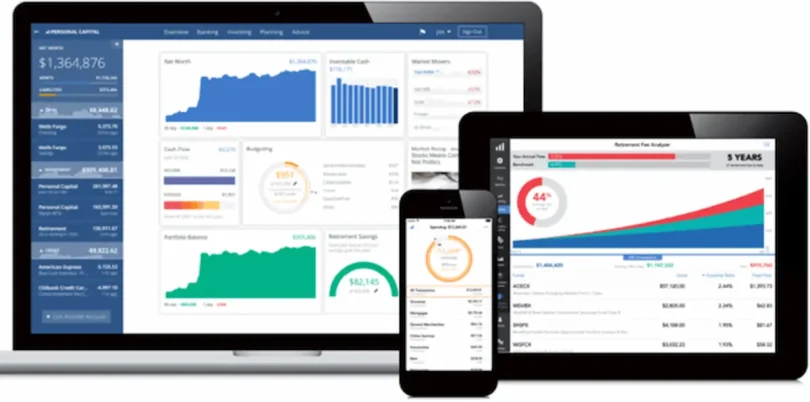

Managing money can feel stressful, especially when you don’t know where it’s going every month. That’s exactly where the best money management tools come in. These tools are designed to simplify your financial life—helping you track expenses, create budgets, save money, and even invest wisely.
If you’ve ever wondered why your salary disappears so quickly, this guide will help you understand how to fix that using the best money management tools in a simple, practical way.
What Are Money Management Tools?
Money management tools are apps, software, or systems that help you:
- Monitor your income and expenses
- Create and stick to a budget
- Save money regularly
- Plan for future financial goals
- Track investments
Think of them as your personal financial assistant that works 24/7.
Why You Should Use the Best Money Management Tools
Many people avoid tracking money because they think it’s complicated—but it’s actually the opposite.
Here’s what these tools can do for you:
1. Give You Financial Clarity
You’ll finally know where your money is going every day.
2. Help You Control Spending
Once you see your habits, it becomes easier to cut unnecessary expenses.
3. Improve Your Saving Habit
Automation makes saving effortless.
4. Reduce Financial Stress
You’ll feel more confident when your finances are organized.
You may also like it:
Best Simple Finance Tools For Daily Use To Track Spending
Simple Budget Tips For Beginners To Save Money Easily
Daily Budget Tips To Save Money and Improve Your Finances
Best Money Management Tools You Should Start Using
Let’s go through some of the best money management tools that are trusted worldwide.
1. Budgeting Tools (Control Your Spending)
Budgeting is the foundation of money management.
- Mint
A very popular app that automatically tracks your expenses and creates budgets. It also sends alerts when you overspend. - YNAB (You Need A Budget)
Focuses on giving every rupee a job. It’s perfect if you want strict control over your money. - PocketGuard
Shows how much money you have left after expenses, making it easier to avoid overspending.
Best for: Beginners and people who struggle with overspending.
2. Expense Tracking Tools (Understand Your Habits)
Before saving, you need to understand your spending patterns.
- Spendee
Offers a clean interface with charts and visuals to track spending easily. - Expensify
Great for daily expense tracking and even business-related spending.
Best for: People who want to analyze where their money goes.
3. Savings Tools (Build Wealth Automatically)
Saving money manually can be difficult, but these tools automate it.
- Digit
Saves small amounts automatically based on your spending habits. - Qapital
Lets you create savings goals like travel, shopping, or emergencies.
Best for: People who find it hard to save consistently.
4. Investment Tools (Grow Your Money)
Once you’ve built savings, investing helps grow your wealth.
- Robinhood
A beginner-friendly app for stock market investing. - Acorns
Invests your spare change automatically.
Best for: Beginners who want to start investing with small amounts.
5. All-in-One Financial Tools (Everything in One Place)
If you don’t want multiple apps, these tools combine everything.
- Personal Capital
Helps with budgeting, expense tracking, and investment monitoring. - Goodbudget
Uses a digital envelope system to control spending.
Best for: People who want a complete financial overview.
How to Choose the Best Money Management Tools for You
Choosing the right tool depends on your needs. Ask yourself:
- Do you struggle with overspending? → Use budgeting apps
- Do you want to save more? → Use savings tools
- Do you want to invest? → Choose investment apps
- Do you want everything in one place? → Use all-in-one tools
Tip: Start with one tool. Master it before trying others.
How to Use Money Management Tools Effectively
Just downloading an app won’t change your finances—you need to use it properly.
Here’s how:
1. Track Every Expense
Even small expenses like tea or snacks matter.
2. Check Your App Regularly
Spend 5–10 minutes daily reviewing your finances.
3. Set Realistic Budgets
Don’t cut everything at once—be practical.
4. Create Savings Goals
Having a purpose makes saving easier.
5. Review Monthly Progress
Adjust your strategy based on results.
Common Mistakes to Avoid
Even the best money management tools won’t help if you make these mistakes:
- Ignoring the app after a few days
- Setting unrealistic financial goals
- Not tracking small expenses
- Using too many tools at once
- Not reviewing your financial progress
Consistency is the real secret to success.
Benefits of Using the Best Money Management Tools
When used correctly, these tools can:
- Improve your financial discipline
- Help you save more money
- Reduce unnecessary spending
- Build long-term wealth
- Give you peace of mind
Final Thoughts
Using the best money management tools can completely change the way you handle your money. You don’t need to be a finance expert—just start small and stay consistent.
Think of it this way: every small step you take today brings you closer to financial freedom tomorrow.
FAQs About Best Money Management Tools
1. What are the best money management tools for beginners?
Apps like Mint and PocketGuard are ideal because they are simple and automated.
2. Are money management apps free?
Many apps offer free versions, but some advanced features may require payment.
3. Can I use more than one tool?
Yes, but it’s better to start with one to avoid confusion.
4. Do these tools really help save money?
Yes, they help you track spending and identify areas to cut costs.
5. Are money management tools safe?
Most reputable tools use strong security and encryption to protect your data.